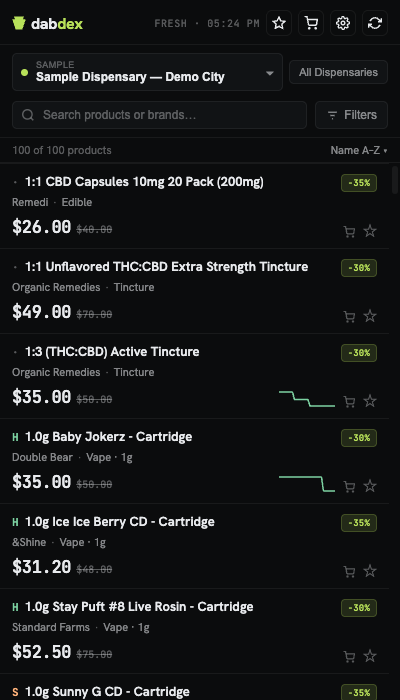
Filter all 185 PA locations by strain, terpene, and price — then compare side-by-side without bouncing between sites.
Catch sales the moment they drop. Add to cart, open everything at once. Chrome and Firefox.
185 locations·19 chains·no account, no tracking, no BS
185locations covered
19chains (all of them)
0data collected
$0forever
What it does
Everything you need. Nothing you don't.
Every PA dispensary in one place. Finally.
🗂
19 Chains, 100+ Locations
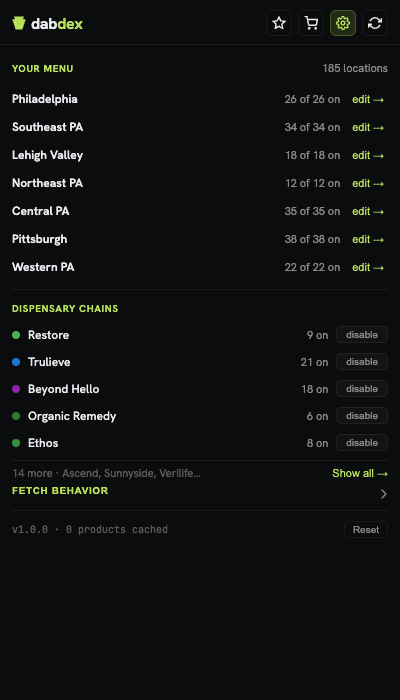
All 19 chains, every PA location — Restore, Trulieve, Beyond Hello, Ethos, AYR, Curaleaf, and 13 more. If it's a PA medical dispensary, it's in here.
📉
Price History & Charts
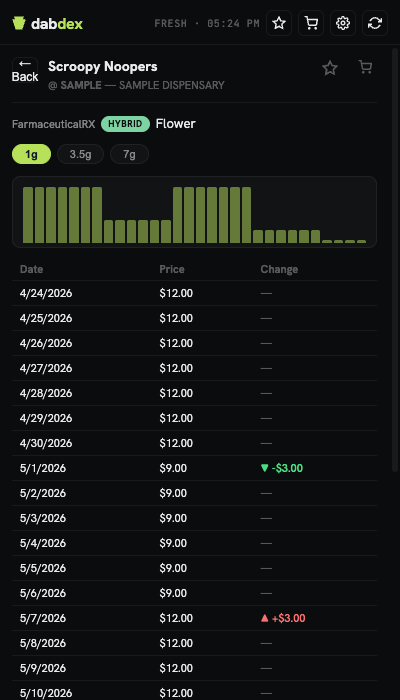
Sparklines on every card. Tap to see the full price history — when the price moved, by how much. Know exactly when to pull the trigger.
🔍
Deep Filters
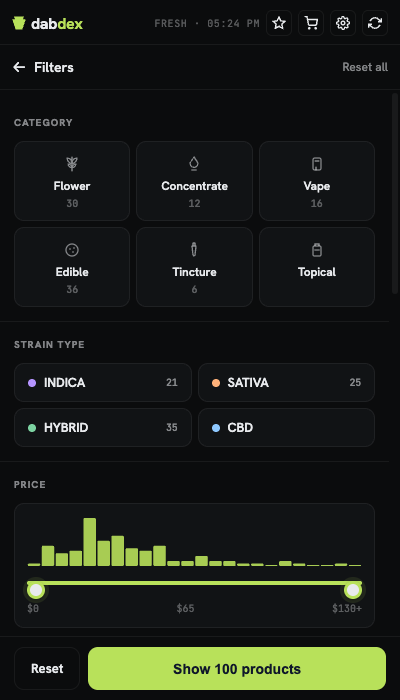
Filter by category, type, brand, strain, terpene profile, and size — all at once, instant. Finally.
↔
Compare Across Dispensaries
Enable "All Dispensaries" and every location you care about merges into one ranked list — cheapest first. Best price, every dispensary, one search.
★
Favorites & Price Drops
Star your go-tos. Every time you open Dabdex, the favorites list flags price drops automatically. Your usual strains, on sale — you'll know.
🛒
Shopping Cart
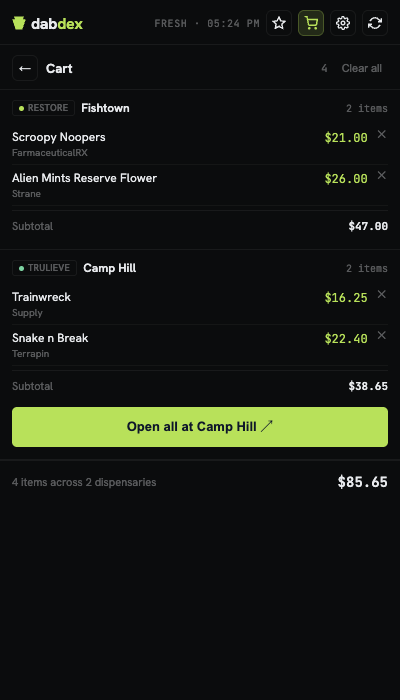
Add from any dispensary as you browse. Hit "Open all" and every product page loads at once — no copy-pasting, no starting over.
Deep Filters
Filter by terpene. Filter by price. Get the exact shelf you're looking for.
Category, terpene profile, strain type, price range — filter everything at once, with a live histogram showing where the deals are stacked. Hit Show Products and your list snaps to it instantly.
Price History
Know exactly when to buy.
Every card shows a sparkline. Tap for the full view — every price change, exact dates, exact amounts. You'll see a sale the moment it goes live, not after everyone else already cleaned out the shelf.
Shopping Cart
Open everything in one click.
Add items from any dispensary as you browse. When you're ready to order, hit "Open all" and every product page opens at once — no copy-pasting, no starting over.
On Sale Now
Prices drop every day. Dabdex catches them.
Sales rotate daily across PA chains. Open Dabdex — they're already at the top. No hunting, no Reddit threads.
Restore−15%
Sour Diesel · 3.5g
S
$34.00$40.00
Trulieve−25%
Wedding Cake · 1g
I
$18.00$24.00
Beyond Hello−24%
Gelato Vape · .5g
H
$32.00$42.00
Ethos−21%
Blue Dream · 3.5g
S
$38.00$48.00
Rise−10%
Purple Punch · 3.5g
I
$38.00$42.00
Ascend−20%
Strawberry Cough · 1/8
S
$44.00$55.00
Curaleaf−26%
Banana OG · 1g Distillate
H
$26.00$35.00
Sample prices for illustration — not live data.
Compare
One search. Every price.
Enable your dispensaries and Dabdex sorts the shelf — every location, every price, cheapest first.
S
Sour Diesel · 3.5g · Flower
RestoreFishtown
$34.00Best
Beyond HelloWilmington Pike
$38.00
TrulieveNorristown
$42.00
vs. checking 3 dispensary sites separately
How It Works
Up and running in 60 seconds.
No sign-up, no settings to dig through. Open the panel and start browsing.
01
Install the extension
Chrome has a 2-minute guided install (the store doesn't allow cannabis apps — even legal ones). Firefox installs straight from Add-ons. No account, no email, nothing.
02
Choose your dispensaries
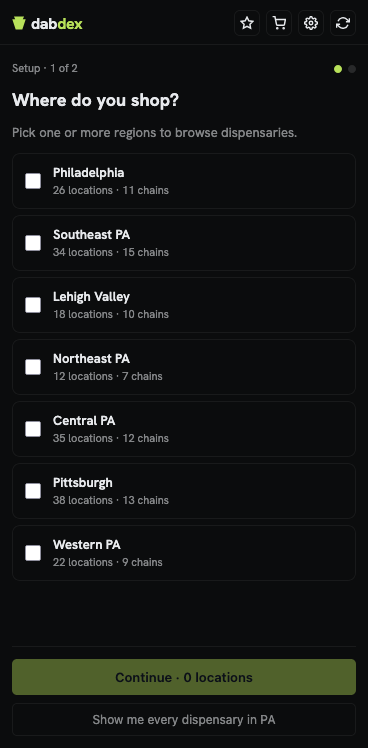
Pick your region and check off any PA dispensary locations you care about. One, a few, or all 100+.
03
Browse, compare, save
Open the side panel on any page. Filter, compare, star the strains you want to track — all without leaving the site you're on.
Coverage
Every corner of Pennsylvania.
Pick your region, choose your dispensaries, and browse. All 185 locations accounted for.
Pittsburgh38 locations
Central PA35 locations
Southeast PA34 locations
Western PA22 locations
Lehigh Valley18 locations
Northeast PA12 locations
Philadelphia26 locations
Supported dispensary chains
Restore
Trulieve
Beyond Hello
Ethos
Ascend
Liberty Cannabis
AYR Wellness
Rise
Curaleaf
Zen Leaf
Organic Remedy
Sunnyside
Verilife
Maitri Medicinals
Vytal
Apothecarium
Bloc
Terra Pharm
The Hive
Restore
Trulieve
Beyond Hello
Ethos
Ascend
Liberty Cannabis
AYR Wellness
Rise
Curaleaf
Zen Leaf
Organic Remedy
Sunnyside
Verilife
Maitri Medicinals
Vytal
Apothecarium
Bloc
Terra Pharm
The Hive
Privacy
Your data never leaves your device.
Dabdex reads publicly available menus and keeps everything in your browser — locally, never uploaded, never sold. No servers. No accounts. No surveillance.
No account, no email, no sign-in
Zero search or browse history collected
Nothing shared with dispensaries, advertisers, or anyone else
Feature
Dabdex
Typical apps
Requires account
✕ No
✓ Yes
Tracks your searches
✕ No
✓ Yes
Shares data with dispensaries
✕ No
✓ Yes
Works without location access
✓ Yes
✕ No
Free forever
✓ Yes
Ads / premium
FAQ
Common questions.
Is it legal to use?
Yes. Dabdex reads the same public menu data you'd see visiting any dispensary website. No logins, no private data, no gray areas.
Does it collect any of my data?
No. All data stays in your browser's local storage and IndexedDB. Nothing is ever sent to any external server. The extension has no backend.
Which dispensaries are supported?
All 19 active PA medical cannabis chains: Restore, Trulieve, Beyond Hello, Ethos, Ascend, Liberty Cannabis, AYR Wellness, Rise, Curaleaf, Zen Leaf, Organic Remedy, Sunnyside, Verilife, Maitri Medicinals, Vytal, Apothecarium, Bloc, Terra Pharm, and The Hive.
How fresh are the prices?
Menus are cached for 30 minutes and refreshed on demand. Hit the refresh button for a live update any time — the 30-minute window just keeps things fast on repeated opens.
Does it work outside Pennsylvania?
Not yet — PA only for now. If your state comes up enough, it'll happen.
Does it work in Firefox?
Yes. Dabdex is available as a Firefox addon via Firefox Add-ons (AMO). It uses Firefox's native sidebar API — the experience is identical to Chrome's side panel.
Is it really free?
Yes. No subscription, no ads, no premium tier. The extension doesn't have a backend — there's nothing to monetize you with even if we wanted to.
Do I need a medical card to browse?
No. Browse all you want. You'll need your card at the dispensary counter — not here.
Every dispensary. One place. Start saving.
Free, private, no account. Takes 2 minutes to install.
The Chrome Web Store restricts medical cannabis apps — even licensed, legal ones. Dabdex is distributed directly instead. Manual install takes about 2 minutes.
1Download
2Extract
3Dev Mode
4Load
Download Dabdex
Click below to download the extension package. Your browser will save it to your Downloads folder.